Fix a skipped ability by checking condition, mana, target, and timing
If a Lootbound companion ability is not triggering, check whether its tooltip condition was true at action time, the companion had enough mana, a valid target existed, and the required turn timing had arrived before assuming a bug or rebuilding. Automatic abilities use the combat state when the companion acts, so a condition that appears later cannot explain the skipped action.
Companion abilities fire when their visible conditions are met at action time. Start with the selected ability's exact wording and compare it with the missed turn. Separate eligibility from effect: first establish whether the condition, resource, target, and timing allowed the ability to fire, then inspect what it would have done. This keeps the diagnosis tied to visible information instead of an unseen priority rule.
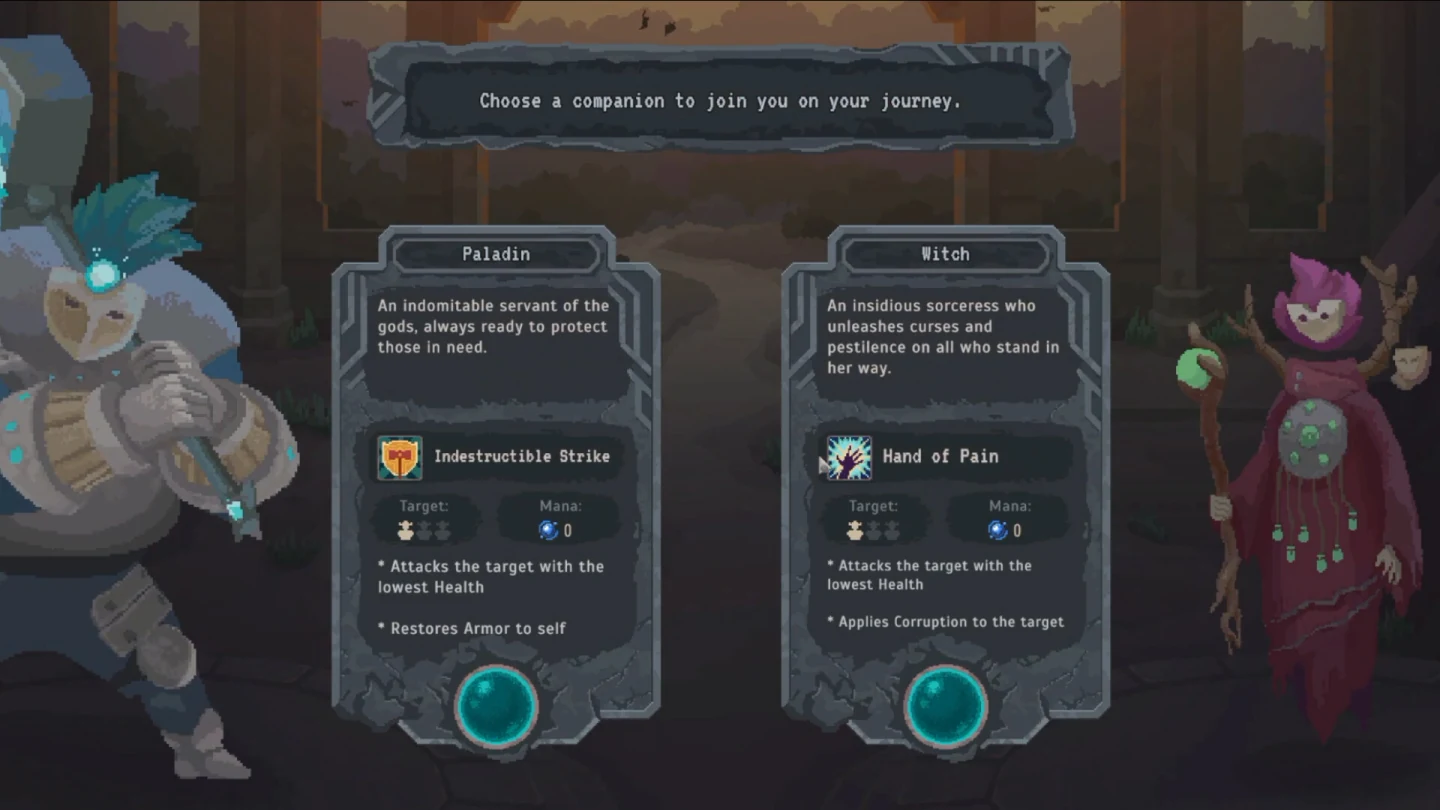
Check the ability's target wording against the current board
A skipped ability and a default attack do not necessarily use the same target rule. Companion default attacks tend toward the enemy with the lowest Health, while the selected ability can name a different valid target or state. Compare the target line with the board at the companion's turn instead of assuming every automatic action uses the default tendency.
Confirm that the named ally or enemy still existed and still matched the tooltip after earlier actions resolved. A defeat, heal, Armor change, status change, or other automatic action can remove eligibility before the companion acts. Use the visible target wording as the boundary; do not infer one rule for every ability when the current board already explains the miss.
- Read the selected ability's own target wording.
- Confirm that at least one valid target existed at action time.
- Recheck the target after every earlier attack, heal, or status change.
- Treat lowest-Health default attacks as a tendency, not a rule for every ability.
Reconstruct the skipped action at the exact turn
Reconstruct the state immediately before the companion acted. Record the tooltip condition, current mana, eligible targets, and position in the turn order. Those four facts distinguish an ability that was ineligible from one that appeared eligible but was skipped, and they prevent a later board state from being mistaken for the action-time state.
Work backward through the earlier turns. A Health threshold can change, a target can disappear, and mana can be spent before the expected action. If the required state appeared only after the companion's turn, the ability was not ready when checked. Recreate the same sequence on the next cycle before escalating the result as a possible defect.
- Condition: confirm the tooltip's described state existed at action time.
- Mana: confirm the companion could pay the displayed requirement.
- Target: confirm a valid ally or enemy matched the skill text.
- Timing: confirm the state existed before the companion's turn arrived.
Check whether another ability spent the required mana first
Read the displayed mana requirement, then compare it with the resource visible at the exact action moment. Enough mana at the start of a round is not proof that enough remained later. An earlier automatic ability can spend the resource before the expected condition is evaluated, leaving the selected action ineligible even though its target still looks correct.
Trace each mana change in order and identify which action consumed it. For a clean retest, avoid creating the earlier condition or change one resource input so the required amount remains available. If the expected ability then fires under the same target and timing state, the missed action was a resource-order problem rather than evidence that its trigger is broken.
| Check | Action-time question | Clean retest |
|---|---|---|
| Condition | Was the tooltip state true when checked? | Create the same state before the turn |
| Mana | Did an earlier action spend the requirement? | Preserve the displayed amount until the turn |
| Target | Did a matching target still exist? | Keep one valid target unchanged |
| Timing | Had the condition arrived before the action? | Move the setup to an earlier turn |
Use the turn order to find when the condition is checked
Read the visible sequence from the current action to the companion's next turn. List every event that can change eligibility: incoming damage, Armor loss, healing, a target defeat, a debuff, or mana spending. Then decide whether the tooltip condition will be true when the companion acts, not merely at the start or end of the round.
Pay special attention to states created too late. If an ally crosses a Health threshold after the companion has acted, that state can only matter on a later cycle. If a valid enemy is defeated one turn earlier, it cannot receive the ability. Marking the exact check point turns a vague timing suspicion into a sequence that can be repeated and compared.
- Locate the companion in the visible turn order.
- Read the selected skill's condition and target again.
- Predict which earlier actions change that state.
- Use the hero to create or preserve the desired condition.
- Confirm the result before planning the next automatic turn.
Retest one visible requirement at a time
Retest one variable at a time: create the condition earlier, preserve the required mana, keep one valid target, or hold the board state steady until the companion turn. Changing only one requirement makes the result useful. If several variables move together, a successful activation does not reveal which earlier mismatch caused the skipped action.
Only consider a bug after condition, mana, target, and timing all match the tooltip at action time across a repeatable test. Record the selected ability, the before-and-after turn state, and the game version, then restart once and repeat without changing the sequence. That evidence separates a persistent execution problem from a single combat-state mismatch.
- Compare the action moment with the exact displayed condition.
- Change only one requirement before the next companion turn.
- Repeat the same sequence before calling the result inconsistent.
- Record visible evidence when every listed requirement matches and the skip persists.